The Professional's Guide to Choosing a Program to Manage Projects in 2026
by Sam Chen
|
A simple to-do list is no longer enough to protect your margins; it is a direct path to the 14% productivity loss currently plaguing complex construction projects. Choosing the right program to manage projects in 2026 requires more than just a digital checklist. You already know the frustration of chasing field reports at 6 PM or realizing too late that expensive equipment sat idle for three days. These information silos between the site and the office don't just cause headaches; they actively erode your bottom line. It's time to demand more from your tech stack.
This guide shows you how to select a platform that provides a single source of truth, automating your report generation and giving you real-time visibility into every crew member on the ground. You'll discover how to move beyond basic task tracking to bridge the gap between field reality and office oversight. We'll break down the essential features of modern project management software and provide a roadmap for regaining control over your most chaotic workflows.
Key Takeaways
Move beyond simple to-do lists and establish a centralized digital ecosystem as your project’s single source of truth.
Select a specialized program to manage projects that delivers real-time visibility into manpower and equipment status across the site.
Replace unreliable paper notebooks with searchable, timestamped digital site diaries to ensure total accountability and transparency.
Prioritize tools with a low learning curve and seamless integration to ensure your field team adopts the technology immediately.
Bridge the gap between field reality and office oversight with documentation built for high-stakes compliance and BCA standards.
⭐ Learn more about GoBuid's feature - without the heavy enterprise price tag
Why High-Stakes Industries Need More Than a Generic Task Manager
Generic tools like Trello or Asana work for creative agencies. They fail on high-stakes job sites where equipment downtime costs thousands per hour. A professional program to manage projects must handle site inspections and manpower tracking as core functions. Generic software lacks the specific architecture for compliance-heavy environments. Meeting BCA standards in Singapore, for instance, requires detailed audit trails that basic task managers ignore. GoBuid manages equipment and submittals natively. It moves your team beyond simple checklists. You gain the power to manage an entire business unit from a single dashboard. This is why choosing a dedicated program to manage projects is a strategic necessity for the 2026 landscape.
Customised Forms for Unique Workflows
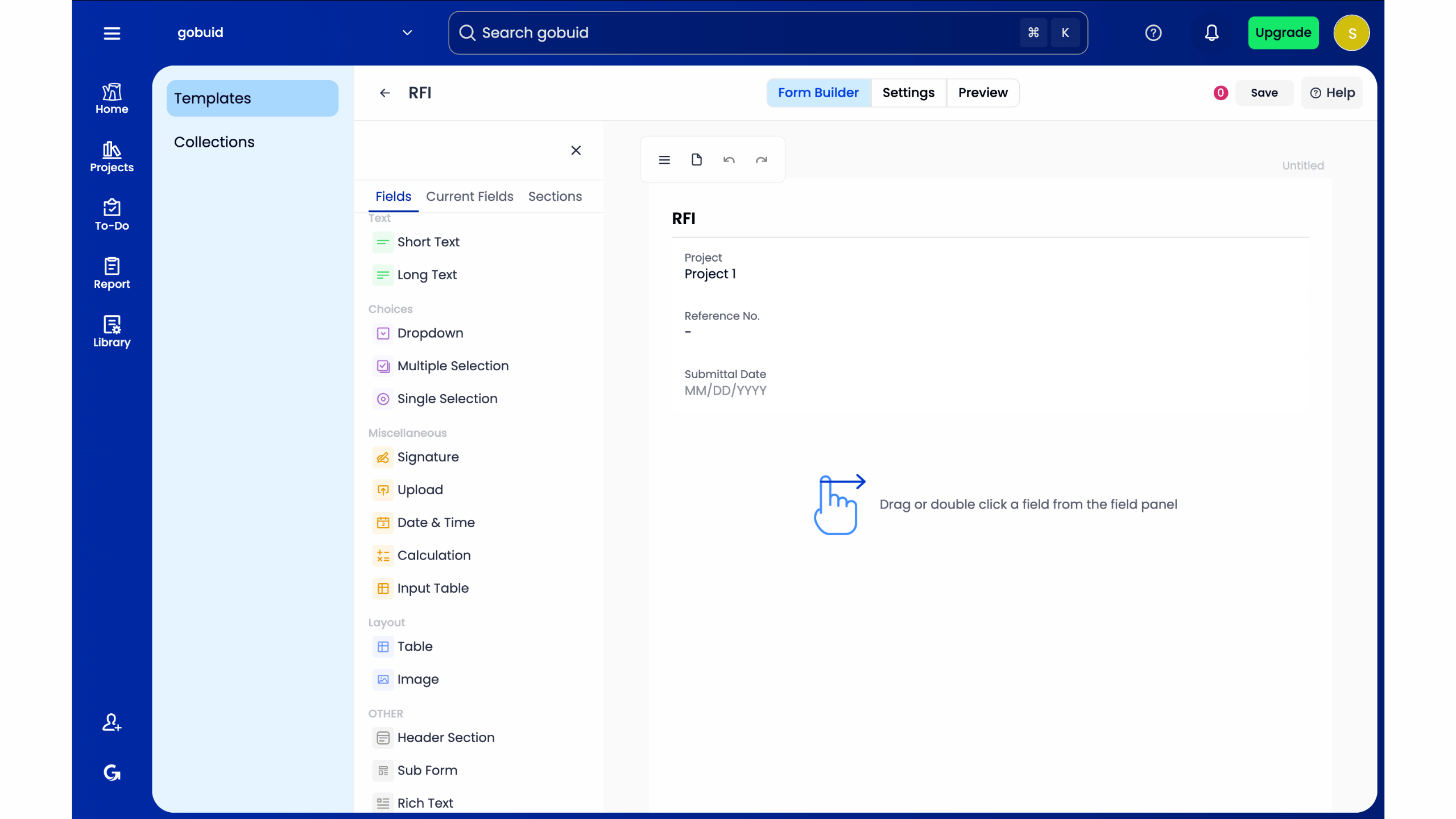
Generic apps force you into their boxes. Your safety audits and quality control checks are unique. Customised forms allow you to digitize your existing paper processes without retraining your entire crew. This transition eliminates lost paperwork and manual entry errors. You get real-time visibility into field operations. It ensures every inspection meets the exact specifications required by your stakeholders. Digitizing your forms means your data is searchable, reportable, and ready for any audit at a moment's notice.
The GoBuid Advantage: Built for the Field
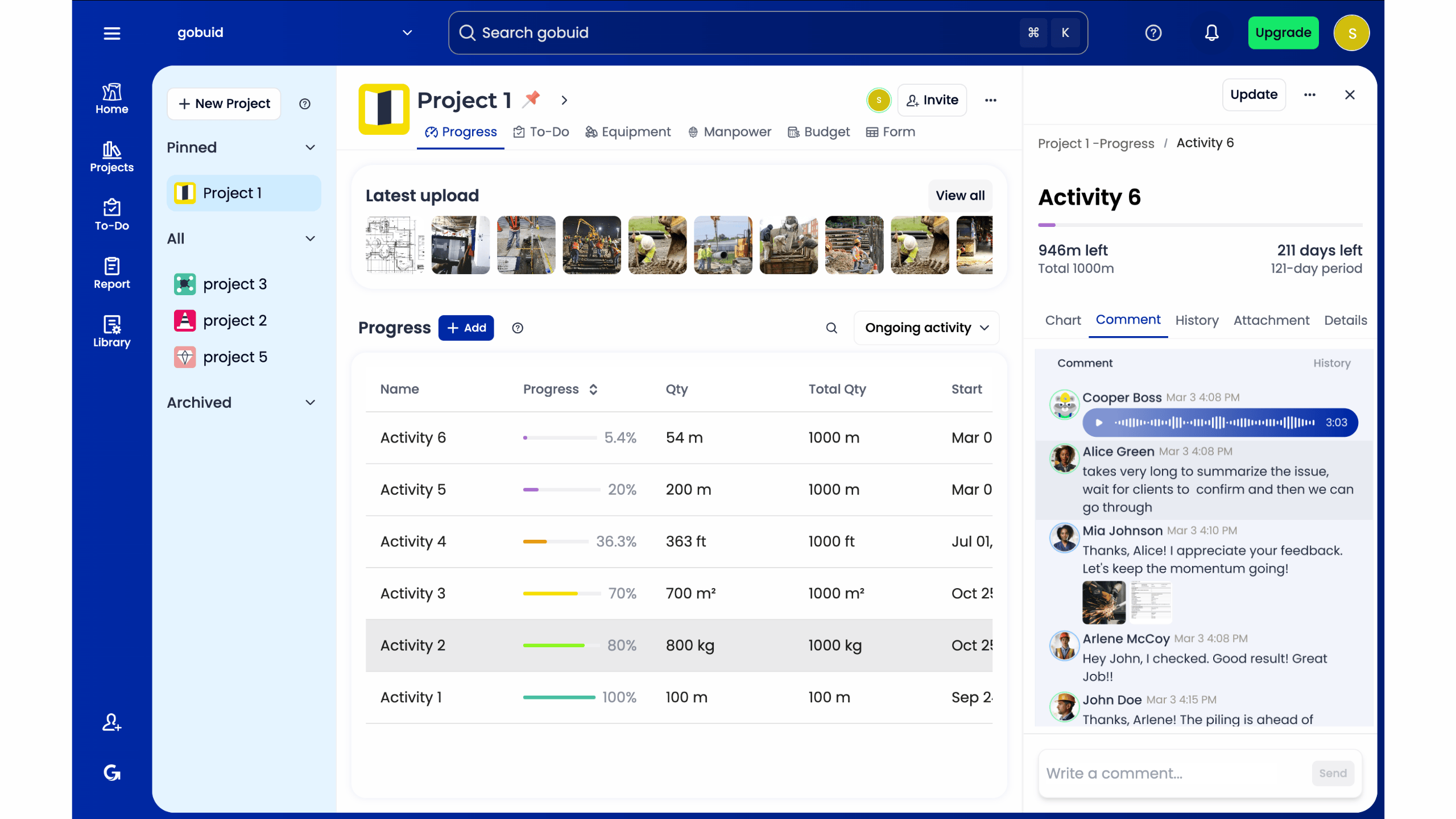
GoBuid acts as your digital foreman. It's a no-nonsense tool that values transparency and results. We bridge the gap between the mud on the site and the data in the office. You get a centralized hub for every submittal, punch list, and daily report. There's no room for ambiguity when deadlines are tight. This is the professional standard for modern construction and engineering. Reliability and calm authority are built into the interface. Start managing your projects more efficiently today.
Understanding the Modern Program to Manage Projects
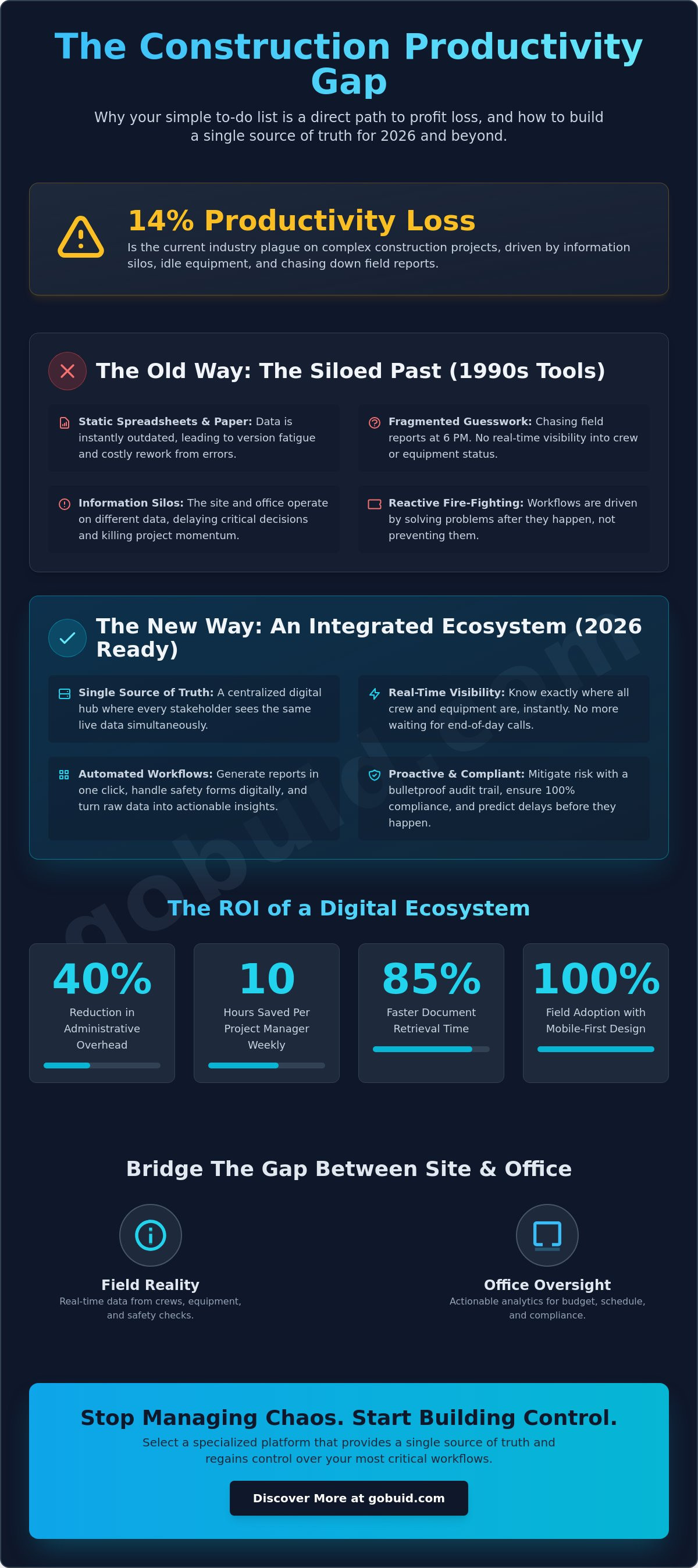
A professional program to manage projects is a digital ecosystem. It's more than a checklist. It's the connective tissue between the field and the office. Traditional project management often fails because of fragmented data. Moving to a single source of truth eliminates guesswork. Real-time visibility reduces administrative overhead by 40% based on recent industry performance data. This shift allows you to focus on the build, not the paperwork. It transforms your workflow from reactive fire-fighting into a proactive, streamlined operation.
To better understand this concept, watch this helpful video:
Why Spreadsheets are Failing Your Projects
Spreadsheets are static. They don't update when a submittals list changes in the field. Manual data entry leads to errors that cost thousands in rework. Version fatigue happens when your team works off outdated files. These silos delay decision-making and kill momentum. A robust program to manage projects replaces these static documents with live feeds. It ensures every stakeholder sees the same data at the same time. You can't run a 2026 project with 1990s tools.
The ROI of Digital Project Documentation
Software is an investment in accountability. It mitigates risk by documenting every action on the job site. Real-time data capture prevents disputes and ensures compliance with local regulations. Selecting the right program to manage projects ensures your mission control stays accurate and accessible. Personal productivity apps can't handle this level of complexity. Professional platforms provide the rugged reliability required to protect your margins. They turn raw data into actionable insights that keep your project on schedule and under budget.
Core Capabilities of Professional Management Software
A professional program to manage projects in 2026 is an active participant in the build. It's no longer just a digital filing cabinet. Real-time tracking eliminates the guesswork that plagues traditional sites. You see exactly where 15 excavators and 40 crew members are positioned at 9:00 AM. You don't wait for a status call at 4:00 PM. Digital site diaries replace coffee-stained notebooks with timestamped, searchable records. This ensures accountability and creates a bulletproof audit trail for every man-hour spent. When you need to generate reports in one click, the software pulls from these live entries. This automation saves a typical project manager 10 hours of admin work every week. Integrated safety forms ensure 100% compliance before the first tool is lifted, turning "paperwork" into a proactive shield against liability.
Bridging the Gap Between Field and Office
The software acts as a digital foreman. It works as hard as the team on the ground. Mobile-first design is a requirement, not a feature. If the interface is complex, field staff won't use it. Success depends on 100% adoption from the crew. When evaluating how to choose project management software, prioritize tools that feel like rugged equipment, not homework. A streamlined program to manage projects bridges the distance between the mud on site and the desk in the office. It ensures the single source of truth is accessible to everyone, whether they're wearing a hard hat or a suit.
Project Analytics and Data-Driven Insights
Raw data is useless without context. A Project Analytics Dashboard provides that context. It turns daily logs into business intelligence. You can predict a 4-day delay two weeks in advance by monitoring progress photos and labor trends. This foresight protects your margins and keeps stakeholders informed with hard numbers. Moving from paper to digital records reduces document retrieval time by 85%, allowing your team to focus on construction instead of searching through folders. You can explore these advanced tracking features to see how total visibility changes the game.
How to Evaluate a Program for Your Specific Industry
Software that sits on a shelf is a wasted investment. If your team requires a month to learn a new program to manage projects, you've already lost the battle for adoption. Field crews need tools that mirror their actual workflow, not complex interfaces that demand a computer science degree. Prioritize a system that offers a 48-hour learning curve for basic functions. If it isn't intuitive, it won't be used.
Your choice must play well with others. Software should integrate with your current customized forms and existing financial tech. Without this connectivity, you create data silos that lead to 14% of global construction rework caused by poor communication. Demand contract flexibility. "No lock-in" agreements are the gold standard for project-based businesses. They keep the vendor accountable for your success every single month. You shouldn't be trapped in a three-year contract for a tool that doesn't evolve with your needs.
Expert support is non-negotiable. You need a partner who speaks the language of submittals and punch lists. When a site crisis hits at 6:00 AM, a generic chatbot won't solve your problem. You need human support that understands industry-specific jargon and the pressure of a looming deadline. This specialized knowledge bridges the gap between technical troubleshooting and practical site solutions.
The Checklist for Site-Ready Software
Offline functionality: Projects often move faster than internet infrastructure. Your team must capture data without a stable connection. The system should sync automatically the moment they're back in range.
Photo documentation: Visual proof ends disputes before they start. It's vital to upload progress photos directly to the site diary to maintain a single source of truth.
Scalability and Pricing Models
Compare per-user pricing against project-based pricing to find the most cost-effective model for your specific volume. Avoid "premium" traps. Hidden fees for data storage or reporting features can inflate your annual costs by 25% or more. A transparent, scalable model ensures your software costs grow only when your revenue does. Selecting the right program to manage projects means finding a partner that values transparency as much as you do.
Take Control of Your 2026 Project Pipeline
The 2026 landscape demands a specialized program to manage projects that can withstand the intense pressures of high-stakes industries. Generic software often fails because it's built for desks, not the 24/7 reality of site operations and field-to-office communication. Success relies on centralized visibility and the ability to generate field reports in seconds rather than wasting hours on manual entry. Moving forward, the most profitable firms will be those that transition away from fragmented spreadsheets toward a single source of truth. This shift ensures every team member stays accountable and every milestone remains visible.
GoBuid provides the technological edge your team needs to stay competitive. Our platform was designed by industry experts specifically for field use, ensuring every feature serves a practical purpose on the ground. You can generate one-click professional reporting to keep stakeholders informed instantly without any technical friction. We don't believe in trapping you with fine print, so we offer no lock-in contracts. Stop fighting your software and start driving your projects toward the finish line with total confidence.
Streamline your site management with GoBuid today
Frequently Asked Questions
What is the best program to manage projects for a small team?
The best program to manage projects for a small team is one that centralizes field reports and punch lists into a single source of truth. Buid provides 100% visibility for teams of 5 to 20 people. It eliminates the 4 hours per week typically lost to administrative rework. Choose a platform that automates submittals and keeps the office and field connected in real-time. This efficiency drives immediate profitability for growing contractors.
Can a project management program replace my site diary?
Yes, a modern project management program replaces traditional paper site diaries with automated field reports. Digital logs capture site conditions, labor hours, and progress photos instantly. According to a 2023 industry survey by JBKnowledge, 62% of contractors now use mobile apps for daily reporting. This digital transition ensures your records are searchable and permanent, protecting your firm against 100% of potential litigation disputes related to missing documentation.
How much does professional project management software cost?
Professional project management software costs vary based on user count and feature sets. According to 2024 Capterra market data, mid-market construction platforms typically range from $100 to $500 per month for small to medium firms. Some providers charge a flat annual fee or a percentage of total project value, usually around 1% of the contract sum. Always request a transparent quote to avoid hidden integration fees or long-term contract traps.
Is it difficult to move my existing project data into a new program?
Migrating data into a new program to manage projects is a streamlined process using CSV imports or direct API integrations. Most modern platforms allow you to upload 1,000+ line items from Excel in under 5 minutes. Buid simplifies this transition by mapping your existing field data to centralized dashboards. This ensures 0% data loss during the handover from legacy systems to a digital environment. It's built for speed and accuracy.
Do I need an internet connection to use project management software on-site?
You don't need a constant internet connection because professional tools include offline sync capabilities. Field teams record punch lists and upload photos in remote areas with 0 bars of service. The software stores data locally and syncs automatically once the device detects a 4G or Wi-Fi signal. This functionality bridges the gap between disconnected job sites and the central office, ensuring 100% data integrity for every team member involved.